
Home toolbar
Home toolbar is intended for frequent and critical camera control functions, including temperature, acquisition parameters, spectrum spans, and run parameters.
Camera parameters displayed at start up may be incorrect!!!
Camera control gets camera parameters from the camera itself, it does not store parameters into a settings file. However the camera driver has been found to report incorrect parameters, for example it may report the fan is on when it fact it's off. This is a known issue, and has been reported to the camera manufacturer. Please make sure to toggle camera parameters to make sure they are applied and displayed correctly.

Acquisition parameters
These parameters reflect the available hardware settings
- 'CCD Cleans' describes removing charge from the CCD pixels before acquisition. It's sometimes also referred as 'resetting'.
- 'Acquisition Time (ms)' is the time used for each frame in the CCD acquisition.
- 'Strips to Bin Before Discard' is a parameter used for data transfer, default value is 2.
- 'Record Mode' is a parameters used by the camera driver for data transfer, default is 'Asynchronous'. This setting only applies to acquisitions with a frame count.
Span parameters
Spans define windows into the spectrum plot, which will be processed live into single values and sent remotely to the scan control app to produce simultaneous maps for each window. The app must be set into the 'Remove' mode.
- 'Insert' adds a new span into the spectrum. A popup menu will be shown to manually input name, start, length, binning and colour of the span - see screenshot below.
- 'Remove' deletes the currently selected span from the spectrum
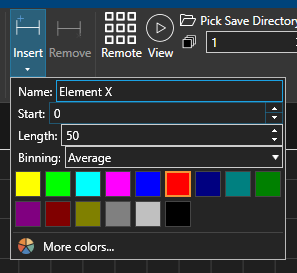
A unique span name must be given before a span can be added!
Run parameters
These define the mode in which the camera will be run and how data will be saved. Camera may be run in remote mode, when the acquisition will be initiated and stopped by the scan control app, or in local mode, when the app is completely independent and not synchronised with beam scanning.
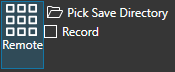
If 'Remote' is enabled, as shown in the screenshot below, then the 'Run' and 'Stop' buttons will be hidden, as they are now remotely controlled by the scan control app, and spectrum windows data will be sent to the scan control app. Local recording of raw spectra data is still available
- 'Pick Save Directory' to specify location of saved data
- 'Record' to enable local save of raw data
If 'Remote' is not enabled, as shown in the screenshot below, then spectrum window data will not be sent to the scan control app, and therefore 'View', 'Record' and 'Stop' control is available locally.
- 'View' will initiate a continuous local acquisition without transmitting or saving any data.
- 'Record' will initiate a repeated local acquisition, to the count provided in the text field and the location picked. This acquisition will automatically stop when the count of spectra is reached.
- 'Stop' may be pressed at any time to stop a 'View' or 'Record' acquisition

File recording
Data may be recorded in pixel units, or as converted to eV or nm units. This setting only applies to the saved .csv file.