
Experiment pane
For convenience, an experiment pane listing the specified spans is displayed in the app, as shown in the screenshot below
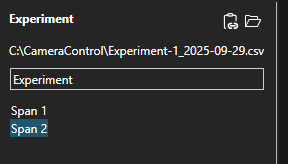
The experiment pane lists the full path of where data will be saved, if 'Record' is checked in remote mode, or 'Record' is pressed in local mode. Path may also be copied to clipboard or open in File Explorer using the button provided here. Experiment name may be typed in the text field, and will be used as part of automated filename, alongside the date of acquisition.
An overview list of span names is provided, and may be used to select a specific span. Selected span will be shown on the plot as well as the Span toolbar.